AI Guidance Document (via Massachusetts DESE)

AI Guidance Manual Quote

My own state’s Department of Elementary And Secondary Education (DESE) just released an excellent guidance document yesterday with suggestions and roadmaps for how school districts — from the top leadership levels down to the classroom teacher — should be thinking and planning on Generative AI’s impact on the educational system and on student learning, and engagement.

You can access the public document here.

I had a cursory look, and I like what I see there. The manual provides necessary frameworks for discussions and policy action on AI in education, with many resource links and discussion points for individuals and groups to consider. It also encourages work around AI Literacy with students, to ensure that topics like ethics, academic integrity, and creative use are done, if at all, in thoughtful ways.

I really appreciated, too, the push of this document is to keep humans at the center of these discussions, and to remind us all that we are the ones with agency (not the AI companies, and not all of the educational material companies now pushing AI as the great savior of education), in how we — the people, from school administrators to teachers to students to families — need to be the ones making collaborative decisions about whether or not to integrate AI in school learning and school systems, and what that could look like, and what is appropriate or not.

The quote at the top of this post is from the end of the DESE AI document, and it captures the essence of this human-centered approach in a way that makes me appreciative of the work this group did on this difficult, and always changing, topic.

Peace (keep it human, y’all),
Kevin
Poetry: Gap

Gap Poem

The other day, there was a prompt at the DS106 Daily Create in which we were asked to find a quote or a poem, and take a word from that text and build a poem around it.

I went to Annie Dillard for this passage:

“Go up into the gaps. If you can find them; they shift and vanish too. Stalk the gaps. Squeak into a gap in the soil, turn, and unlock-more than a maple- a universe. This is how you spend this afternoon, and tomorrow morning, and tomorrow afternoon. Spend the afternoon. You can’t take it with you.”
― Annie Dillard, Pilgrim at Tinker Creek

And I focused on the word “gap” to write this poem:

there, beneath
where you once
removed the river rock,
and tossed it to the trees,
an outline remains,
a pocket for rains

smooth sands
by gravity’s fingers;
and in your mind,
the rock’s still there;
it’s the gap that disappears

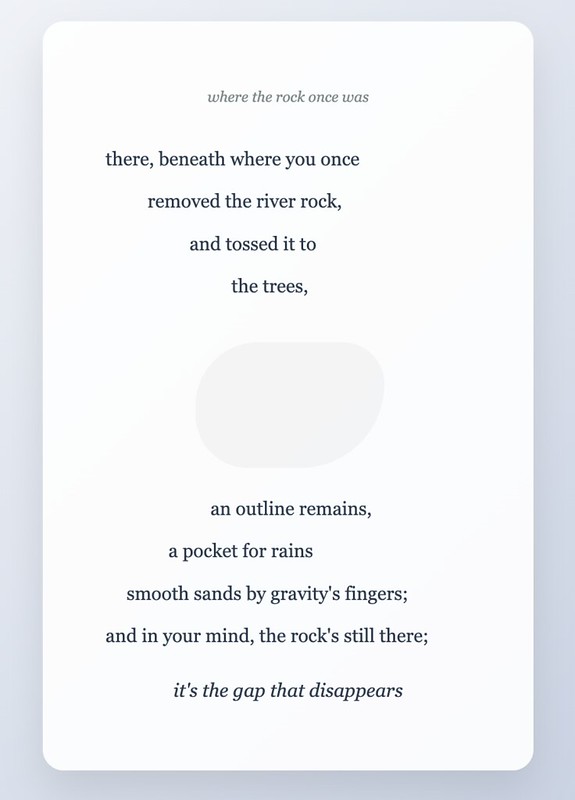
Afterwards, I really wanted to do something visual with the poem, and I tried all sorts of ways to show that there was a “gap” in the space where the rock once was, where there was a pocket of rain, but all of my experiments went nowhere.

In the end, I asked Claude AI to design a visual, and spent time giving it instructions — even at one point, asking it to create an interactive site where a reader could remove the stone, to leave a gap, and have the words of the poem become scrambled — but Claude failed in that. It did, however, generate the artwork I have here, which is not terribly bad, and better than the art I was designing.

Peace (and poems),
Kevin

AI And Teaching

John Spencer has a thoughtful and helpful blog post about how teachers can think about AI with the start of school on the horizon. It’s worth a read.

John ends with this:

“So here we are. A new school year is beginning, and the ground is still shifting. Generative AI isn’t a passing trend. It’s a tool, a context, and in many ways, a mirror that reflects how we think, learn, and create. But it doesn’t have to take over. As educators, we get to decide how we respond. We can lead with wisdom, not panic. We can make space for nuance, not quick fixes. And we can keep students at the center of it all.” — John Spencer

Peace (with curiosity),
Kevin

AI Invades Google Classroom

I haven’t been looking at my school things for a few weeks as I continue to decompress from a pretty good school year (I will miss those kids!) but a blog post in my RSS about Google’s introduction of it Gemini AI Tools into Google Classroom caught my attention.

It’s there in my Classroom administrative tools, all right, and I guess the suite of AI applications is there by default. While I can see how Google is trying to bring in AI tools that look a lot like what other sites (including paid sites) have in the market, making it a default addition makes me worry about how quickly some teachers might turn to AI instead of their own best practices.

I hope I am wrong.

If you want to know more, from a critical perspective, I suggest taking a read of Default On; Quality Off; Google Classroom’s New AI Tools at Beta Classroom.

I appreciate this final message in the post for teachers:

“I see you. I know you’re tired. I know you’re looking for anything that might make this impossible job a little bit easier. But I need you to hear this: Easy is not always better. Fast is not always good. And AI-generated is definitely not always appropriate for your students. Before you use any of these tools, ask yourself: Is this better than what I already have? Does this serve my students’ learning better than the research-based resources I know work? Am I using this because it’s genuinely helpful, or because it’s convenient? Do I know someone who can help me determine their quality?”

And I liked this: “Your professional judgment matters more than Google’s algorithms. Trust it.”

Peace (in noticing),
Kevin

Interact with the Poetry Sound Visualizer

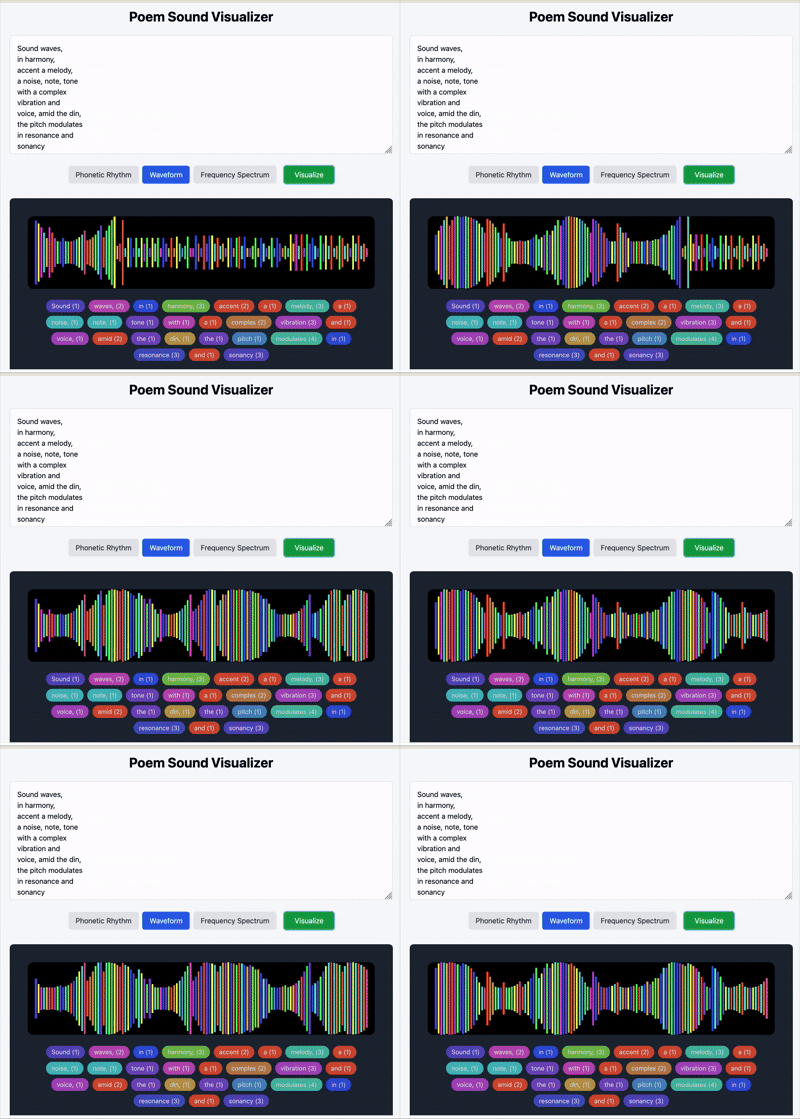
This is my third post about using Anthropic’s Claude to Vibe Code or create small web apps, and after guiding the AI to make an app that used sound visualization art for some of my own poems (see post), I wondered if I could get Claude to create an interactive web app that would allow anyone to input their own short poems and get sound visualization responses to their words.

Yep.

I spent time asking it for three visual variations for inputted poetic text based on syllable and letter counts:

  • Phonetic Rhythm
  • Waveform
  • Frequency Spectrum

Check out the Poetry Sound Visualizer. Give it test, if interested, and let me know what you think.

Caveat: I did not mind feeding my small haiku poems into the AI tool but you should at least think about how your words might be used by the Claude AI Large Language Model system. All words likely feed its database of phrases, etc. It’s good to be aware.

Peace (listening in),
Kevin

Haiku Sound Visualization

Haiku Sound Visualization

Yesterday, I shared my first forays into Vibe Coding with Anthropic’s Claude. Vibe coding is the term for using AI to create small web apps for a specific task. While some coding skills are helpful, they are not necessary. It’s more that you need to refine your instructions and revise the AI’s work until you get to something close to what you want to have created.

With Claude, it builds the apps right in it window and then provides a preview, and then hosts the app online, when you hit the publish button. I am not sure if other AI apps do it the same way or not.

I decided to try to get a little deeper into vibe coding, using a series of recent morning Haiku poems as the text. I did a few experiments to work with the poems (such as randomizing phrases to create new poems, and switching lines of the poems with other lines of poems to create new poems) but then a side experiment with an interesting response by Claude sparked an idea around the concept of word-to-sound.

I went into that word/sound/visualization rabbit hole, trying to get at a way to create an app that connected my poems to sound visualization.

It worked, and I think it’s pretty nifty.

Check it out.

Here are the notes from Claude on what it was doing as it was coding:

I’ve created an expanded application that explores the connection between poetry and sound through four different audio-inspired visualizations:

  1. Enhanced Waveform Visualization
    • Creates dynamic sound waves based on syllable patterns and sound types
    • Analyzes hard consonants (k, t, p, d, g, b) vs. soft consonants to shape the wave amplitude
    • Displays both the wave pattern and a filled area representing sound intensity
    • Shows vowel/consonant ratio and hard/soft sound distribution for each poem
  2. Musical Staff Visualization
    • Translates each poem into musical notation on a standard five-line staff
    • Converts words to musical notes with:
      • Note position based on vowel concentration
      • Note duration (whole, half, quarter, eighth) based on syllable count
      • Accents based on presence of hard consonants
    • Preserves the lyrical structure by showing words under their corresponding notes
  3. Frequency Spectrum Visualization
    • Analyzes the distribution of letters as if they were sound frequencies
    • Displays vowels and consonants with different intensities of the same color
    • Shows the “sonic texture” of each poem through letter frequency analysis
    • Includes metrics on vowel/consonant balance and hard/soft sound distribution
  4. Phonetic Rhythm Visualization
    • Maps the natural rhythmic patterns in each poem
    • Represents strong (stressed) and weak syllables as different-sized nodes
    • Shows how words connect rhythmically along a timeline
    • Groups words into rhythm patterns to reveal the poem’s natural cadence

Each visualization uses sound-related principles to transform your poems into visual representations that capture their acoustic qualities. The app analyzes:

  • Syllable stress patterns (strong vs. weak)
  • Vowel and consonant distribution
  • Hard vs. soft consonant sounds (which affect perceived texture)
  • Natural rhythmic groupings

These visualizations help reveal the musicality inherent in your poetry, demonstrating how the sound patterns contribute to each poem’s unique character and flow.

Peace (sounding like poems),
Kevin

Vibe-Coding Experiment

VibeCode: Irish Wisdom

Maybe you’ve heard of “vibe coding” — using AI tools to create small task-specific web-based apps, where even a little knowledge of coding is barely required. I’ve been listening to Hard Fork podcast, where users are sharing the ways they are creating apps with AI for specific tasks. It seemed interesting and worth a look.

So I jumped into Anthropic’s Claude (my AI of choice), and asked it to create a generator of text that used lyrics from the late Shane MacGowen, of The Pogues, as its source. I watched as the AI created the code in its window, then showed me a preview, and then I hit the publish button to see the site, live. This all took only a few minutes.

Claude then explained to me how it used phrases inspired by Shane and not direct lyrics (probably copyright infringement protections, which I suppose it a good thing), and then asked me a series of questions about revisions, such as did I want to add sound clips?

I did, but the coded product, of course, needed sound files, which Claude does not have but I could have taken the code elsewhere and added sound. I also tried to add a photo gallery of Shane pics, and again, it coded the template for me, but would not provide the photos.

I still did some tinkering, through requests, on the visual design of the site, until I landed on something that I was Ok with. Check out the app that Claude made for me: Irish Wisdom.

Overall, I found the experiment interesting, and will need to ponder a better use for this function.

Peace (in the code),
Kevin

PS — here is the link to the section of Hard Fork where folks called in about their own “vibe coding” adventures. It’s interesting.

Adobe Firefly AI Video: Musical Notes

I received an email that my request to try out the beta version of Adobe Firefly’s new video component came through so I gave it a whirl.

My prompt: A glass jar that has musical notes floating inside and then outside the jar, with notes resembling fireflies.

My reaction: I found this generator a bit better that some of the other video AI sites that I have tinkered around with. But I also know, all of these video sites are getting better. The colors are nice, with the notes glowing, and the movement is pretty smooth. (Six second limit here reminds me of a Vine video. Not much time for anything other than a hint.)

And then I used up my two prompts rather quickly, so that’s that, for now.

Peace (on the air),
Kevin

Blogging4Life: Favorite Posts


This is the last of a series of posts answering some questions about a life of blogging that started (I believe) via Tom Woodward, (maybe via this blogger) but that I first saw via Alan L, Sarah H and Martin W through a renewed push to return back to blogging spaces and away from corporate social media platforms. I am breaking down the series of questions into different blog posts.

What’s your favorite post on your blog?

How about some favorite posts and not just one single choice?

I wish I had a better way to curate/remember the various projects that I have done, with my blog as an anchor point of reflection. Here are a few posts/projects I’d like to highlight here in this act of personally celebrating and remembering (particularly as I have moved my blog to a new domain here). You will notice that collaboration and music are often key focus areas on these, as I have often tried to use technology and digital media to connect and create with others in my various networks:

  • The CLMOOC Poetry Re-Mixer Machine (a riff off an audio project from Alan Levine, who was so helpful in guiding me through the process of creating this project). This was a real learning experience for me, and I was grateful for the support and the contributions of others, and the time I spent, diving into something new and pretty cool, if I don’t mind saying so myself.
  • My Bird Song Remix inquiry in which I tried to use AI tools and others to learn and use bird songs, including this final project in which I wrote, recorded a bird song song.
  • I’ve done plenty of explorations of AI because I am trying to understand it. I am resisting the urge to demonize or celebrate it. This post about making music took me some time to carve out. I am still not sure where I sit on the issue of what is music and what is not.
  • Years back, I took part in another collaboration, this time off Mastodon, called A Whale’s Lantern, that matched two musicians/songwriters together from different parts of the world, to create original music together. (see a post about deconstructing the process) After the first round, I did a series of interviews with the people, and wrote it up as an Oral History. Here is part one and here is part two.
  • I guess birds are a common concept, too. I once created an arc of poems called Birds In Flight, and this post is my reflection on the process of all six pieces of that project.
  • For one year’s Write Out project, we had more than 100 people contribute lines of poem to a Where We’re From project, and then I had people record audio, which I stitched together into an audio poem. I love how the many voices are woven together here.
  • Here is a post about a poem I wrote for five different voices, with friends helping out with the recording.
  • I often collaborate with Terry Elliott, and here are two that I think are good examples of what we have been doing over the years we have been friends. First, our Liminal Adventures (which led to a picture book creation) and then, more recent, using some of his writing as my inspiration for media, Signals And Noise.
  • On Songwriting — this was the seventh and last of a series of posts about writing songs as I walked through the process of a new song. These process notes are a reminder to myself that all art starts somewhere, but needs focus and creative vision

Peace (pondering it),
Kevin