My Son’s Remix Project: Trump and Futurama

Rowan's iMovie project

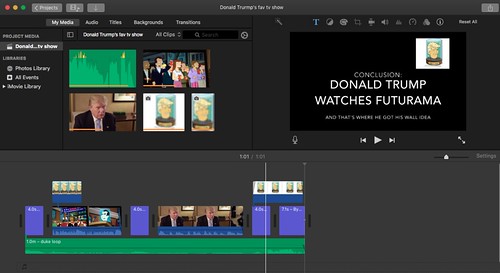
My youngest son (age 11) was watching an episode of Futurama a few weeks ago. In it, Richard Nixon (with his head in a jar) is talking to a crowd of people, about building a wall to keep space aliens out. A light when on in my son’s head. He remembered all the hoopla about Donald Trump building a wall.

So, he started to plan out this idea of a political remix, of meshing Trump’s call for a wall on the border with Mexico with Head-in-Jar Nixon’s call for a wall in outer space. I helped him get the videos he wanted to use but he knows enough about iMovie now to do the editing and mixing himself. I was mostly hands-off.

The result? Pretty cool political remix, I think, for an eleven-year-old kid who understood that he could make political commentary with pop culture elements. Of course, I am biased. He’s my kid. You’ll have to watch and see what you think.

Peace (remix it for greater effect),
Kevin

App Review: Chosen (Music Video Creator)

Chosen App

This was sort of fun. I guess. I heard about a music video mobile app called Chosen that is becoming popular with young people (after, typically, not necessarily being used in the way it was built for). Kids use it for lip-syncing videos, and the company just got rights to millions of songs, I guess.

I figure it’s always a good idea to get a handle on what is becoming popular (still have yet to do Snapchat, though, so maybe take my pronouncements with a grain of salt) and so I dove into Chosen.

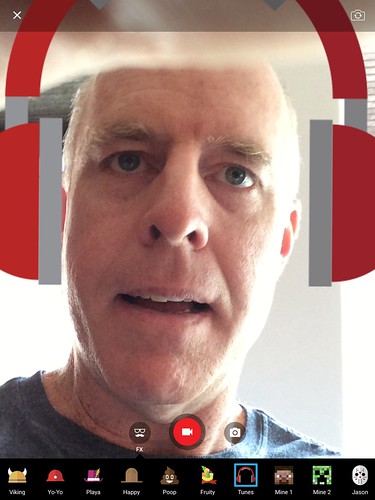
It’s pretty simple to use. You can record your voice or music, or choose music (this is the lip-sync method). There are some funny overlays you can choose. You hit “record” and do your thing. The video gets saved to your device and you can share it out. Or you can share it within the Chosen ecosystem. (Note: the folks might want to, eh, choose, a new name I could not shake a religious theme from my mind when hearing the name of the app).

Here I am, grooving to Justin Timberlake’s song of the summer on pop radio:

Give it a try. See what you think. Maybe we can do a lip-sync competition during CLMOOC?

Peace (muse it),
Kevin

Tech Pedagogy: An Annotated Exploration


flickr photo shared by zoxcleb under a Creative Commons ( BY-SA ) license

My friend, Terry, recently published an entire series of blog posts in which he introduces and explores various technology tools, from an angle of pedagogy. He wonders as much of “the why” as much as the “here it is,” and I like that.

I’ve collected his series of posts as an Outliner in my Diigo bookmarking world, pulling out some of Terry’s words and adding a few of my own as an attempt at annotating what he was doing.

You can can view the Outline here on Diigo, if you want.

Or you can see it all right here in a sort of messy version of the Diigo Outliner.

In either case, bookmark what he was up to, and share it out. I’m sure that will make Terry happy.

Tellio’s Tour of Tech Pedagogy
  • RhetCompNow | Nowhere but here.
    “I also believe that unless technology evokes fun and the spirit of play it will never be personally useful to you as a teacher and learner.  So…I propose to bring you a series of tech tools, processes and information that you will come to find are “as handy as a pocket on a shirt”.” — TerryDon’t know Terry Elliott’s blogs? You should. He’s always up for the unexpected — either through sharing of what he is learning at one of his online spaces or asking questions meant to push our thinking. Revive the signals? Yes. (That’s the tagline at one of his blogs) This outline list of links tracks and shares Terry’s work to uncover the pedagogy behind various technology for learning. While he made these posts for his Writing Project Summer Institute, he is kind enough to share them out to the world. Enjoy. Learn. Create.

    • Writing Project Tech Pedagogy: Episode Thirteen (6/24/2016) | RhetCompNow (Managing the Media Overload)
      “Today’s post strays into a briar patch where only rabbits feel comfortable: the sense that the noise of the net is drowning the inner signal that is trying to get out of ourselves, our voice.” — Terry.
      Me: Here, Terry pulls back the cover on how he manages his media stream. It’s easy to feel overwhelmed. Having a means to manage it all is important.
    • Writing Project Tech Pedagogy: Episode Twelve (6/23/2016) | RhetCompNow (Finding Media to Use for your Projects)
      “Do you need free?  As in “copyright free, CCBY,  public domain sounds and music for a student or personal project” free?  If so, your options are extraordinary and here are a few of them.” — Terry.
      Me: Remixing and using media for creation can get tricky. The best option? Make stuff yourself. The next best option? Find someone who is freely offering their work for your use, and then point back to the artist.
    • Writing Project Tech Pedagogy: Episode Eleven (6/21/2016) | RhetCompNow (Assorted Summer Reading Doo-Dads)
      Me: Terry gives us some options for online summer reading.
    • Writing Project Tech Pedagogy: Episode Nine (6/18/2016) | RhetCompNow (Neat Stuff)
      “Some websites are cool tools unto themselves. I am going to share a few of those today. They have proven to be artesian wells of knowledge and prompts to action. I hope you enjoy them as well.” — Terry.
      Me: I didn’t realize he had my blog on there. Well. Thanks. I love how Terry annotates as well as shares. He models for the rest of us how we can think out loud, for the benefit of the self and for others, about the “whys” of what we’re doing.
    • Writing Project Tech Pedagogy: Episode Eight (6/18/2016) Analog Meets Digital: the Fountain Pen as Strange Attractor | RhetCompNow (Of Fountain Pens and the Analogue World)
      ” love fountain pens. I love what you can do with a decent one. ” — Terry.
      Me: Writing comes in all forms. I do find myself leaning in to the digital a little too often, perhaps, and I admit, I have not written with a fountain pen since … I was a child, playing with ink. This is a nice reminder that the tools we use to write can often shape the writing we are doing.
    • Writing Project Tech Pedagogy: Episode Seven (6/17/2016) | RhetCompNow (Make YouTube and Online Videos Work for You)
      “Want to use YouTube in the classroom, but find it a bit risky and potentially embarrassing or worse with younger students? Wish you could convince your district to open up YouTube but not sure how to argue for it?” — Terry.
      Me: For teachers wondering how to safely use the vast media out there in the classroom, Terry points us in some various directions.
    • Writing Project Tech Pedagogy: Episode Six (6/16/2016) | RhetCompNow (Twitter and Its Potential)
      “Today, a simple suggestion. Use Twitter for professional development.” — Terry.
      Me: I’m not sure if his Writing Project colleagues took him up on the offer, but there is little doubt that Twitter has completely changed the way teachers can connect and share and learn from each other. It has completely turned the whole PLC concept on its head … in a good way … (but avoid the echo chamber effect)
    • Writing Project Tech Pedagogy: Episode Five–the Ides of June Edition | RhetCompNow (Audio Annotation)
      “My post today is about annotating SoundCloud. Yes, you can make time specific notes on sound files. It’s free, easy to use, congenial to share, and worth having in your repertoire.” — Terry.
      Me: Over the years, Terry has reminded me time and again about the power of adding text annotations to digital media, and here, he explores the very rich opportunity that Soundcloud has baked into its system.
    • Writing Project Tech Pedagogy: Episode Four (6/14/2016) | RhetCompNow (Annotating Images)
      “All of this activity falls under what I think of as “developing a repertoire.”  The Internet is still a collection of small tools loosely joined.  All you need is a small collection of tools in order to create and share.” — Terry.
      Me: Here, Terry introduced Pablo. I never heard of Pablo. You can do fun things with images and text, such as write short text pieces or add annotations. There are, of course, many ways to do this, but sometimes, it’s worth checking out a new technology in order to see what might happen, even if the tech is not designed for that experience. And I like Terry’s words about having a collection of things to pull from.
    • Writing Project Tech Pedagogy: Episode Three (6/13/2016) | RhetCompNow (Annotate the Web)
      “Hypothes.is allows you take any web page on the Internet and annotate the text.  Like Vialogues, it is free and open to all.  You just need to sign up with them and then begin.” – Terry.
      Me: What happens when your thinking meshes in harmony and reacts in contrast to others’ opinions? You get a conversation. Technology like these ones provide a path through the gap. Not perfect. Not yet. But a path, just the same. We can talk and react and learn.
    • Writing Project Tech Pedagogy: Episode Two (6/12/2016) | RhetCompNow (Close Read This)
      “Close reading is an old buzzword.  The idea of slowing down and breaking open a text in order to explicate its meaning goes back to the the very earliest Biblical scholarship.  Like most ideas it bears a bit of skepticism.  In other words use it and don’t be used by it. ” — Terry.
      Me: Good words, there. Terry turned me on to Vialogues some time back and I love that it allows people to interact with a video, and that you can skip and jump from comment to comment, and it lands on the video the comment is about. Nice.
    • Writing Project Tech Pedagogy: Episode One | RhetCompNow (What He’s Up To)
      “Life is short, teaching time is precious.  If the tool is handy and you find it is valuable to you personally, pedagogically or professionally, then “have at it, hoss”.  If not, then move on to the next one. I will promise to do my best to not waste your time. ” — Terry
      Me: Thanks, man.

Peace (it’s all good),
Kevin

#2NextPrez: Annotation Nation with Hypothesis

Annotation Nation: Using Hypothesis

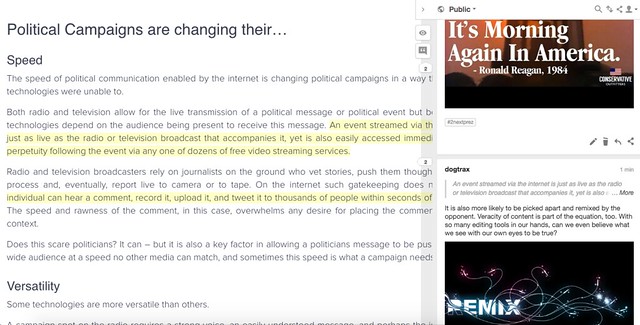
As part of Letters to the Next President 2.0, we are being asked to annotate articles about the political sphere. The organizers suggest Hypothesis, which I already regularly use. Hypothesis is a web-based annotation tool. You can use the bookmarklet that you can install right in your browser (that’s what I do) or use direct links (see my invite below).

I was curious about how technology is changing politics, and dug out this article: Three Ways The Internet Has Changed Political Campaigns, and dug into it as best as I could. It’s short and I invite you to come annotate with me. That’s the beauty of crowd annotation — we can all dig into the same articles together.

Come annotate Three Ways The Internet Has Changed Political Campaigns with me. This link will bring you right into Hypothesis.

The idea behind a public annotation activity is to get all of our voices into the mix. This summer’s Letters to the Next President seems to be designed to allow teachers to play and remix and use the tools, in hopes of discovering some ways to engage their own students in the fall when Clinton vs. Trump becomes loud and overwhelming.

Note: Hypothesis also collects annotations around common tags, so if you want to see/read all annotations on all articles with the #2nextprez tag, you can do that.

Peace (beneath the texts),
Kevin

#2NextPrez Zeega Mix: Woody Guthrie Lives Inside of Me

All this talk of presidential politics and writing Letters to the Next President had me revisiting a song of mine called Woody Guthrie Lives Inside of Me. I had recorded this song a few months ago as a Corner Concert (where I turn the camera on and just sing a song), so I took that audio file from the video and used it in a Zeega for a multimedia project.

I aimed to celebrate the resurgence of Guthrie’s message, and to try to use Zeega layering for various images and movement. Some worked. Some didn’t. I also framed the Zeega as a multimedia letter itself.

In reality, the politics of Guthrie is “Left” of me these days (I am more Center, although where Center is these days seems less and less solid). Still, Guthrie’s notion of fairness and of advocacy, and of using music and song to connect and inspire action? That is something that has always stuck with me.

Special thanks to Terry for continuing to host Zeega for playing and tinkering and making.

Peace (please),
Kevin


#2NextPrez Make Cycle: Breaking the Media with MediaBreaker

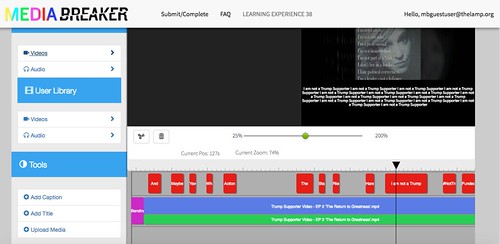
So, consider me intrigued … I just re-discovered the MediaBreaker tool by The Lamp as part of the Letters to the Next President campaign. MediaBreaker is like the old Popcorn Maker (I still miss you, Popcorn!) by Mozilla, in that you can layer media and text on top of video content. In this case, the idea is to make commentary on top of political videos.

Using MediaBreaker

I tested it out with a video from a Trump Supporter, and added some textual commentary as a counter propaganda move. I could not figure out how to publish/view the final edited MediaBreaker, nor how to create my own account in MediaBreaker itself (I did create a teacher account in its Studio). I did hit the “submit” button, so maybe it gets processed and reviewed before becoming public (I think that is the case). The MediaBreaker YouTube channel is here.

Ideally, the site would allow me to save and then kick out an embed code for sharing. But it doesn’t seem to do that. So, not only did I just lose all of my work (ack), I can’t share with anyone outside of MediaBreaker what I was doing. This may be intentional — a way to keep student work behind a “wall.”  (Students have to be 14 years old or older to use MediaBreaker so that counts my students out).

I like the possibilities of MediaBreaker, but it still feels a little funky and clunky to use. You have to download a video to your computer and then upload it into the editing tool. I am not sure if students can upload their own videos, or if they can only use what the teacher has uploaded. I wish the video being used could be native to the Web itself, as folks with slow Internet speeds will be left out of the remix possibilities.

Peace (in the breaking of the media),
Kevin


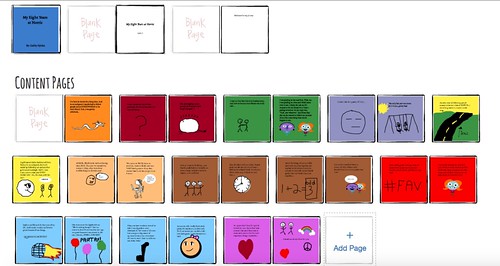
An Inside Glimpse of Digital Picture Books

Gabby Book Overview

My students have been beta-testing a site that is designed to allow students to design Picture Books that lead to publishing in hard-cover format. It’s been an interesting experience, which I hope to write about down the road a bit, but last week, they finished working on their books (about their years at our elementary school as they prepare to move on to the regional middle/high school).

I took some screenshots for this video teaser ….

Peace (in the pictures in the book),
Kevin

Design Problems: What You Get Is a Mess

I am participating in an online course through FutureLearn about using movies as literacy moments in the classroom. It’s been interesting, but in the first week, one of the activities was about creating context for a character and then sharing a photo on a Padlet wall.

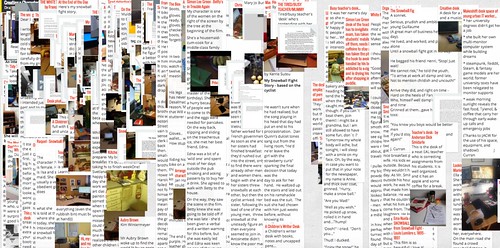
I went there, just to see what was going on. I thought my computer was melting down. The Padlet Wall is so overstuffed with posts that it is impossible to even look at. Well, unless you are intrigued by bad design, as I am. Then, you realize, this activity in a massive, online course is not the right scale for an interactive wall such as padlet.

What you get is a mess.

Bad Padlet

Now, there is a certain chaotic beauty to the wall. But discerning any one thing is now nearly impossible. I suspect that this wall was used for previous iterations of the course, too, and folks just keep on layering.

Peace (the wall’s crowded),
Kevin

Margaret Atwood: How Technology Impacts Storytelling

I found this video and find it quite interesting. Writer Margaret Atwood’s thoughts on how technology shapes our writing process and our conceptions storytelling (or not) connects with a lot of my wondering out loud about the ways that writing is changing, and shifting, in the modern era (but I am open to the argument that nothing is changing at all).

See what you think ….

Peace (in the story about stories),
Kevin

When Frustration Hits the Wall of Resilience


flickr photo shared by octaviosn under a Creative Commons ( BY-NC-SA ) license

I like to think I am always open to new technology for my young writers, and I am not afraid to beta test or try out new platforms that show possibilities for my students. I do make sure I try things out first on my own. As a sort of mental checklist, I consider a few things before bringing a new tech idea into the classroom:

  • Does the technology compliment or enhance the writing of my students?
  • Does the technology provide for collaborative elements, or at least, allow for the possibilities of connected writing?
  • Is there a low frustration threshold for learning the new technology so that learners across the spectrum can feel successful?
  • Is it free? And if it is free, does it have advertising?

Now, I am always open to some frustration on the part of my students. That’s how many of them learn. That’s how I learn. You, too, probably. We run into a wall, find a workaround, share the workaround with others, and push forward.  Sometimes, I am the one who has to guide my students on that path. But by this time of year, most of them can do that on their own. Or turn to each other.

They’re learning perseverance and resilience when it comes to the limitations of technology. On a side note, this resilience does not always transfer to other content areas, such as math, where we see too much “giving up” or blind “pushing through” on the part of many students. Some theories about the increase in this helplessness focus on family life (helicopter parents) and standardized testing (there is one right answer, kid). We’re all, in education, still working on this.


flickr photo shared by El Chepi under a Creative Commons ( BY-NC-SA ) license

So, now to the present. My students have been piloting a site designed to support writing and publishing. The site has cool potential. I don’t want to go too deep into the context or specifics because of the various networked connections of the project, due to the early stages of things and it is not important to my story here, but I reached a point the other day where frustration hit the wall of resilience, and I did something I rarely do: I backtracked.

The technology got into the way of the writing. This is the best way for me to put it. The technology got into the way of the writing.

I spent entire class periods, scrambling from one student to another with hands raised, troubleshooting what should have been easy fixes, only to discover there was nothing easy about the fix. I spent my time dealing with the technology, and not with the writing and ideas, and by the end of the day, I had had enough. This is not how I teach. I don’t think I have ever abandoned a technology in the midst of using it in the classroom — usually, I vet it pretty well — but this situation presented too many problems, too much of the time. I came close to pulling the plug.

flickr photo shared by rosipaw under a Creative Commons ( BY-NC-SA ) license

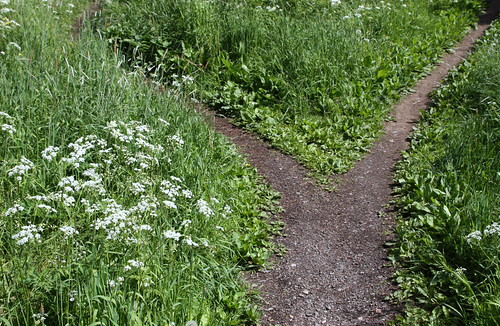
The next day, after a night of thinking of little else and then letting those who run the platform know about my decision the next morning, I decided to offer up some alternative paths to students (including staying with the existing technology, if they chose, and there were some embedded incentives within the platform on why they would do that). Suddenly, putting that choice into their hands got the whole project back on track once again in a very positive way.

Still, I am left with lingering teacher doubts. Should I have kept at it? Did we “persevere” in the face of difficulties? Or did we give up too soon? I’m comfortable with my decision here, but I still have those questions looming around in my head. That’s why I am writing this blog post, after all.

I think resilience means finding ways around, or through, the walls that emerge in our learning process. Yet resilience does not mean crashing headfirst in the wall, again and again, with the same results (and a bad headache). Maybe knowing where resilience ends, and where the new starting line begins, is one of the keys here.

POST-BLOG-UPDATE-NOTE: A day later (I wrote this original post the other day and stuck it in my draft bin to mull it over) … First of all, those who run the platform have been very support of the decision to give the option to students to abandon the platform. They want us to put educational needs of students first, even if it meant disrupting the beta testing. They completely understand. Second, surprisingly, many of the students chose to STAY with the platform, even with all of its problems and technical glitches, and the choices I presented to them. I find that decision so interesting and I look forward to seeing the projects now underway make their way to completion in the coming weeks. Perhaps my students are teaching me a lesson about resilience.

Peace (in, and through, and out, and around),
Kevin